Why Cute Script Adds a Touch of Delicate Elegance to Any Design
There’s a specific challenge in modern design: how do you make a digital product feel human? In a landscape dominated by clean sans serif fonts and rigid grid systems, adding warmth and personality is essential for standing out. This is where the choice of typography becomes your most powerful tool. When you need to convey sophistication mixed with approachability, a standard serif font often feels too formal, while a basic handwritten font can look unprofessional. You need something in the middle—something that feels crafted and intentional.
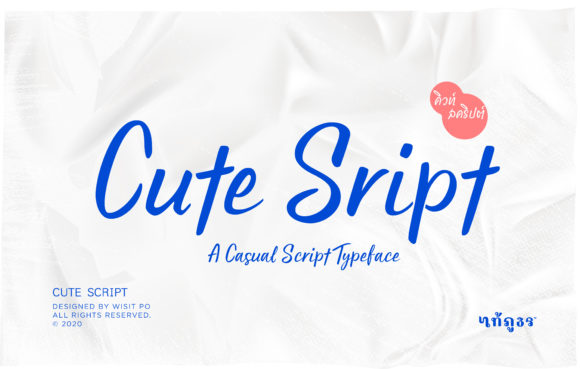
Cute Script is a premium font that bridges that gap beautifully. It is a lovely and delicate script font that exudes elegance and class. Unlike heavy, looping calligraphy that can overwhelm a layout, this typeface was crafted specifically for designers who need a beautiful and refreshing look. It offers the fluidity of a handwritten font but with the polish required for high-end commercial projects. Whether you are working on branding for a boutique or designing an invitation for a gala, the visual weight of this font strikes a perfect balance.
The Anatomy of Elegance: Visual Characteristics
Understanding the visual personality of a font is the first step in using it effectively. Cute Script is not a monoline script; it has a delicate stroke variation that mimics the pressure of a real pen. This characteristic gives it a dynamic quality, making the text feel alive rather than static. The letterforms are designed with generous spacing and distinct connectivity, ensuring that the flow remains readable even at smaller sizes. It avoids the overly swashed look that sometimes makes script fonts illegible.
The overall appeal of Cute Script lies in its versatility. It carries a romantic, feminine energy, but it is grounded enough to be used in professional contexts. Think of the difference between a casual note scribbled on a napkin and a signature on a legal document. This font leans closer to the latter, but with a softer touch. It is a creative font that manages to be decorative without sacrificing clarity, a rare quality in the world of display fonts.
Strategic Applications: Where This Font Shines
As a designer or business owner, you need to know exactly where an asset fits into your workflow. Cute Script is a powerhouse for specific niches, particularly where brand identity relies on emotional connection.
Branding and Logo Design
For entrepreneurs in the beauty, fashion, or lifestyle sectors, a logo sets the tone for the entire customer experience. Using Cute Script for a wordmark or a primary logo element instantly signals luxury and care. Imagine a bakery logo, a florist’s brand mark, or a high-end boutique clothing tag. The font does the heavy lifting of establishing that "premium" feel. However, it is vital to ensure that the font’s style aligns with your target audience. If your brand is edgy and industrial, this delicate script might send a mixed message. But for brands focusing on elegance, it is an ideal match.
Packaging and Editorial Design
In packaging design, the shelf appeal is everything. A script font like this works exceptionally well for product names or descriptive headers on labels. It draws the eye and invites the customer to pick up the product. Similarly, in editorial design—such as magazine headers or blog post graphics—Cute Script can break up the monotony of body text. It provides a visual hierarchy that guides the reader's eye from the headline down to the content.
Digital Presence and Social Media
The digital space demands high engagement. On social media graphics, a static, boring font gets scrolled past. Cute Script adds a layer of personality to Instagram quotes, Pinterest pins, and Facebook headers. It mimics the hand-lettering trend that performs so well on visual platforms, giving your content an authentic, crafted feel. For web design, it should be used sparingly—perhaps for a hero section headline or a call-to-action button—to maintain fast load times and high readability.
Mastering the Pairing: Practical Typography Guidance
One of the most common mistakes in design is using a script font for everything. Cute Script is a display font, meaning it is designed for impact, not for long paragraphs. To maximize its effectiveness, you must pair it with a complementary typeface.
The Classic Combination: Pair Cute Script with a clean, geometric sans serif font. The simplicity of the sans serif acts as a canvas, allowing the script to pop. This creates a modern typography look that is professional and easy to read. Think of using the script for the main headline and the sans serif for subheadings and body copy.
The Editorial Look: For a more traditional or academic vibe, pair it with a classic serif font. This works well for wedding invitations or book covers where you want a timeless aesthetic. The contrast between the structured serif and the fluid script creates a sophisticated tension that feels expensive.
Practical Testing: Before finalizing your design, always test the font pairing at different scales. View it on a mobile screen and a desktop monitor. Does the "Cute Script" still look legible at 14pt? Does the kerning (spacing between letters) look awkward when specific letters like 'b' and 'e' sit next to each other? Checking these details ensures your design assets remain professional.
Licensing and Technical Considerations
When using a commercial font like Cute Script, understanding the licensing is crucial. Most premium fonts come with different tiers of licenses. A desktop license allows you to install the font on your computer for creating print materials or static images. However, if you plan to use the font on a website using @font-face, you typically need a separate webfont license. If you are creating a mobile application, an app license is required.
Always review the End User License Agreement (EULA) included with the font files. This document outlines what you can and cannot do with the typeface. For instance, some licenses allow for unlimited commercial use, while others might restrict the number of prints or the number of users who can install the font. Respecting these boundaries is part of being a professional content creator.
Furthermore, check the technical details of the font file. Does Cute Script include OpenType features? These might include stylistic alternates, ligatures, or swashes that allow you to customize the look of the letters. Accessing these features usually requires design software like Adobe Illustrator or Photoshop, giving you creative control to make the typography truly unique to your project.
Conclusion: Elevating Your Visual Narrative
In the crowded world of digital and print media, the details matter. Choosing a font is not just about picking letters; it is about choosing a voice for your brand. Cute Script offers a distinct voice that is delicate, elegant, and refreshingly beautiful. It provides the visual cues of quality and care that audiences instinctively recognize.
Whether you are a small business owner revamping your packaging, a marketer designing a new campaign, or a crafter creating a personalized gift, this font offers the flexibility and style needed to elevate your work. By understanding its strengths, respecting its limitations, and pairing it thoughtfully, you can transform a standard design into something memorable. It is more than just a script font; it is a tool for storytelling.