Bringing a Personal Touch to Digital Projects with Rabbit Script
In a world saturated with clean, geometric sans serif fonts and authoritative serifs, there's a growing desire for designs that feel human. We crave that authentic, handcrafted quality—the sense that a real person is behind the message. This is precisely where a typeface like Rabbit Script carves out its essential space. It’s not just another script font; it’s a tool for injecting personality, warmth, and a touch of handmade elegance into your digital work.
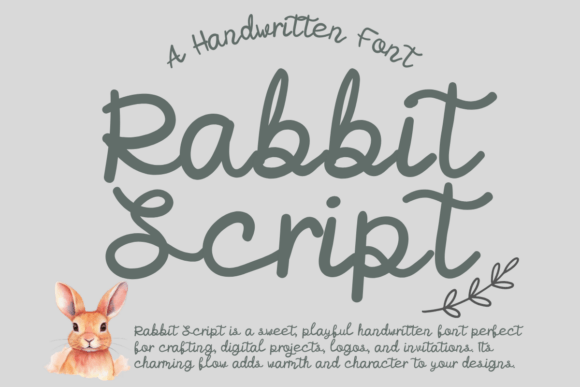
At its core, Rabbit Script is a fluid, handwritten font designed to mimic the natural flow of a pen on paper. Its visual character strikes a delicate balance. It’s not overly formal or stiff, nor is it so casual that it becomes illegible. The letterforms feature gentle, connected strokes with subtle variations in weight, giving it an organic, authentic feel. This isn't a font that shouts; it speaks with a confident, approachable whisper. Its personality is one of creativity, warmth, and personal connection, making it a versatile player in any designer's toolkit.
Where Rabbit Script Truly Shines
The real strength of a premium font like this lies in its application. Its versatility allows it to adapt across a surprising range of projects, each time adding a distinct layer of character. Think beyond the obvious. While it’s a natural fit for wedding invitations or greeting cards, its potential extends much further into modern design landscapes.
For brand identity, Rabbit Script can be a game-changer. Imagine a boutique coffee shop logo, a small-batch skincare brand, or a personal blog header. Using this script font for the brand name establishes an immediate sense of personality and approachability. It tells your audience you’re a brand that values craftsmanship and personal connection. Paired with a clean sans serif font for body copy, it creates a beautiful and professional visual hierarchy that guides the eye and reinforces the brand's story.
- Digital Planners & Note-Taking: Its primary design purpose shines here. Using Rabbit Script in apps like GoodNotes or Notability transforms digital planning from a sterile activity into an engaging, creative process. It makes your notes feel personal and uniquely yours.
- Social Media Graphics: On platforms like Instagram and Pinterest, standing out is everything. This handwritten font can make quotes, announcements, and call-to-action text pop, stopping the endless scroll with its authentic appeal.
- Editorial & Web Design: Use it for pull quotes, article titles, or section headers in editorial design. It breaks up the monotony of long-form text and adds a moment of visual interest that draws readers deeper into the content.
- Packaging & Product Design: For packaging design, especially for artisanal or handmade goods, Rabbit Script communicates quality and care. It can highlight a key ingredient, a product name, or a "thank you" message on the box.
Practical Guidance for Using This Creative Font
Choosing a creative font is only half the battle. Using it effectively is what separates good design from great design. Here’s how to integrate Rabbit Script into your workflow with professional results.
Evaluating Project Fit and Readability
First, ask yourself if the project's tone aligns with the font's personality. Rabbit Script is perfect for projects that need a touch of warmth, creativity, or elegance. It might not be the best choice for a formal legal document or a technical manual, where a straightforward serif or sans serif would be more appropriate. Always prioritize readability. Test the font at the size it will be used. While beautiful, script fonts can become challenging to read in long paragraphs or at very small sizes. Use it for headlines, logos, or short bursts of text where its character can be appreciated without hindering comprehension.
Mastering Font Pairing
A great font pairing is the secret to balanced design. Rabbit Script, as a display font, works best when contrasted with a simpler, highly legible typeface. A classic and reliable strategy is to pair it with a neutral serif font for a sophisticated, timeless look—think a blog layout or a book cover. For a more modern, clean aesthetic, combine it with a geometric or humanist sans serif font. This combination is excellent for web design and social media graphics, ensuring your message is both stylish and crystal clear.
Before committing to a project, take a moment to explore the font file itself. Many premium design assets include bonus features. Look for alternate characters, ligatures, or swashes. These extra glyphs can add a significant level of customization and flair, allowing you to fine-tune the look and avoid repetitive letterforms. Finally, always check the license. Understanding the terms of the commercial font license ensures you can use Rabbit Script confidently across all your client work, logo design projects, and commercial products without any issues.
Ultimately, Rabbit Script is more than just a collection of letters. It’s a bridge between the digital and the personal, a tool that allows designers, marketers, and creators to communicate with a genuine human voice. By understanding its strengths and applying it thoughtfully, you can elevate your projects, build a more memorable brand, and connect with your audience on a deeper level.